Generated Passwords Don’t Need Special Characters
This really needs to be said:
If you are generating passwords, do not include special characters.
That’s right, I said it. Passwords without special characters.
I know, countless password policies and recommendations from all kinds of places mandate the use of at least one special character in a password. But guess what, adding an exclamation mark at the end doesn’t mean you now have a good password.
This rule is a rule of thumb that is given to users who are generally non-technical to help them choose a better password. The idea is that if adversaries are trying to find a password from its hashed form using brute force, they must work harder the larger the alphabet that makes up the password. And that’s true. Except brute force rarely plays a role.
As an adversary, you either try the most obvious passwords like Summer2026! or
Passw0rd! in the case of online password-guessing attacks, or, in the case of
an offline password-guessing attack, you go through a whole dictionary of words
and apply some common transformation rules to each one, like appending some numbers, writing
the password twice, replacing o with 0, etc. Very rarely do you actually try
every combination of letters there is up to some length, which is what we mean
by “brute force”.
Passw0rd! is clearly a terrible password, but it passes most password
policies. And honestly, if you are trying to come up with a password, you are
most likely doing it wrong in the first place. Today, people commonly have
dozens if not hundreds of accounts. Most people realize by now that reusing
passwords is a bad idea, so a password manager is pretty much mandatory. And if
you are already using a password manager, you are probably generating your
passwords, save for a handful. Which is great!
Any password that has been randomly generated is much more secure than almost anything you can come up with in your head for the aforementioned reasons. Even if it only consists of letters and numbers. Or even just letters, if it is long enough.
Nobody will ever guess vx5O8Ytqb0ewqY2W. Trust me on this. There are more than
\(10^{28}\) passwords just like it – adding a dash in the middle will have no
meaningful impact on its security.
Meanwhile, a password like YT\s87`JS&TDU);w leads to nothing but issues. I
couldn’t even type it plainly here in my blog software because of the backtick
in the middle.
It’s also a huge pain to type in if the keyboard layout doesn’t match the physical labels on the keyboard. This probably doesn’t happen to most people, but I happen to prefer the QWERTY layout while also living in Germany, so mismatches are common for me. What makes it worse is that my job requires me to be onboarded to a different customer around once a month. I either get a physical device, have to use a buggy Guacamole/Citrix/Whatever browser interface, or a vSphere web console. Copy and paste is often not an option. And usually you can’t see what you are typing!
Even if copy and paste was an option, I cannot select the password above by double-clicking it, because some of the special characters are interpreted as “end of word” characters. Annoying.
It gets worse. I have had customers hand me a letter, with my initial password printed
using a sans serif, variable width font, where l and I look identical, which cost me time
and nerves. That’s not the worst part yet. A while ago, I kid you not, I was
given a password that started with a space. A space! In a password! For no
reason! It took two hours and two calls with the help desk to figure that one
out.
I’ve actually recommended in the past (only half-jokingly) to add a space to the end of a password, so when an adversary cracks your password against all odds, they’ll probably read it on the command line where trailing spaces are invisible:
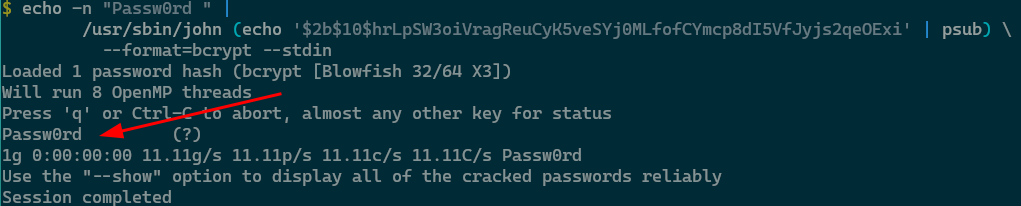
(Guess what, this actually bit me once as well when I tried to enter a password from my password manager on a separate laptop. My password manager is pass, which prints the password on the command line. But I digress.)
But jokes aside, just don’t use special characters in generated passwords please.
I know some password policies won’t accept a password without special characters
even if it has been generated. In such cases, I add a dot in the middle. It’s in
the same position on all keyboard layouts I’ve ever seen. Some policies are just ridiculous. Special shout-out goes to
Cryptshare, which deems JTbEmE9Pcvbd2JGh as not secure enough, because it
contains the keyboard pattern cvb.
Inspired by Ricky Mondello, who wrote about generated passwords at Apple, I use a small script that generates somewhat pronounceable passwords which should satisfy most policies:
#!/bin/bash

# Generate first two parts:
# call pwgen twice, uppercase first letter of each, then join
part1=$(pwgen -AB0 5 1 | sed 's/^\(.\)/\U\1/')
part2=$(pwgen -AB0 5 1 | sed 's/^\(.\)/\U\1/')

# Generate four random digits
part3=$(printf "%04d" $((RANDOM % 10000)))

# Output as <1>.<2>.<3>, replace ambiguous characters
echo "${part1}.${part2}.${part3}" | tr 'IOZzYy' 'AUSsJj'
Yes, this will cost us some entropy. How much? We can approximate the entropy with this command (shamelessly stolen from this StackExchange answer):
for i in $(seq 1000) ; do generate-password.sh ; done \
    | xz -9e - | wc -c
8152
Divide by 1000, multiply by 8, and that’s roughly 64 bits of entropy per password of length 16. Good enough for me.
Here are some examples:
Pahse.Aeque.4852Peiso.Upoot.8630Aipoo.Hieka.4123
But other than that, please just don’t use special characters in generated passwords. It’s security theater.